
Download 8Flight Aviator – Flight Planning Platform, Fuel Pricing, Airport Services, Pilot Tool, iPhone App
Overview
8Flight Aviator is a data-driven flight planning platform designed specifically for iPhone users. The software aims to streamline the flight planning process by offering real-time, accurate information on fuel pricing, FBO services, and airport amenities. It is tailored for pilots who require reliable, up-to-date data to make informed decisions during trip planning and in-flight operations. The app is developed by Eight Flight LLC, a company focused on aviation technology solutions. Its primary purpose is to eliminate inefficiencies associated with traditional flight planning methods, such as calling multiple FBOs to compare fuel prices or manually researching airport facilities.
Target users include private and commercial pilots who frequently travel between airports and rely on timely, accurate information to optimize their flight routes and schedules. The app supports offline access, allowing users to retrieve critical data during flight without an internet connection. This feature is particularly valuable in remote or low-connectivity environments. Real-world usage scenarios include pre-flight planning, in-flight adjustments, and post-flight reviews. The platform integrates fuel pricing, FBO availability, and ancillary services like dining and lodging into a single interface, enabling users to make holistic decisions that enhance efficiency and convenience.
Key Features & Capabilities
- Real-Time Fuel Pricing – Provides up-to-date retail avgas and jet fuel prices, as well as contract fuel rates, allowing pilots to identify the most cost-effective fuel options.
- Comprehensive FBO Data – Offers detailed information on FBO services, including operating hours, self-serve vs. full-service options, and available amenities.
- AI-Powered Data Engine – Utilizes an AI-based system supported by human reviewers to maintain data accuracy and freshness around the clock.
- Offline Access – Data downloads seamlessly and remains accessible without an internet connection, ensuring usability during flight.
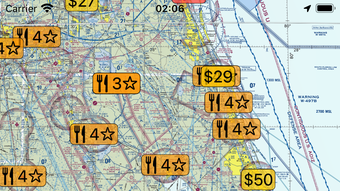
- Integrated Airport Services – Includes listings for restaurants and hotels, filterable by user arrival time to match availability with schedule.
- Weekly Updates – The development team releases frequent updates, introducing new features such as advanced weather data and concierge flight planning services.
These capabilities enable pilots to reduce planning time, avoid unnecessary stops, and improve overall flight efficiency. For example, a pilot planning a cross-country trip can use the app to compare fuel prices across multiple airports, select FBOs with preferred service types, and reserve accommodations based on arrival windows—all within a single interface. The integration of AI and human oversight ensures data reliability, while offline functionality supports mission-critical operations.
User Interface, Workflow & Performance
The user interface of 8Flight Aviator is designed with iPhone users in mind, emphasizing clarity and ease of navigation. The layout is intuitive, with map-based displays and filter options that allow quick access to relevant data. Pilots can browse airports, view fuel prices, and locate FBOs, restaurants, and hotels with minimal interaction. Navigation is streamlined through contextual menus and visual cues, reducing cognitive load during time-sensitive operations.
Workflow efficiency is enhanced by the app’s ability to store and retrieve frequently used airports and routes. The integration of real-time data with offline access ensures consistent performance, even in low-connectivity environments. While specific performance metrics such as CPU or RAM usage were not provided, the app is designed to function smoothly on modern iPhone hardware.
The developer did not specify resource usage details, but general software behavior patterns suggest optimized performance for mobile platforms. Stability appears to be a priority, supported by regular updates and a focus on data accuracy. No issues related to crashes or freezes were reported in the available information.
Compatibility & System Requirements
8Flight Aviator is designed exclusively for iPhone users. The software operates on iOS, though the specific version requirements were not listed. Installation size and hardware specifications were not disclosed.
The developer did not provide additional system requirements. Compatibility information is limited to the iOS platform, with no mention of support for iPad, Mac, or other devices. The app leverages iPhone’s built-in capabilities, including GPS and offline data caching, to deliver core functionality.
Exact performance details were not specified, but the app is intended to function effectively on current iPhone models.
Pros and Cons
Pros
- Real-time fuel and FBO pricing data for accurate trip planning
- AI-powered data engine with human oversight ensures reliability
- Offline access allows data use during flight without connectivity
- Integrated airport services including restaurants and hotels
- Frequent updates with new features like weather and concierge planning
- Designed specifically for iPhone, ensuring optimal mobile experience
Cons
- Platform limited to iPhone; no support for other devices
- Exact system requirements and file size not disclosed
- Availability of advanced features may depend on subscription after trial
- Reliance on internet for initial data sync and updates
- Limited information on long-term performance and battery impact
FAQ Section
Is 8Flight Aviator compatible with iPad or Mac?
Currently, the app is designed exclusively for iPhone. There is no information available about support for iPad or Mac devices.
Is the app secure and reliable for flight planning?
The app uses an AI-based data engine supported by human reviewers to maintain accuracy. Data is updated continuously, and offline access ensures functionality during flight. However, specific security protocols were not detailed.
How often are updates released?
The developer releases updates almost every week, introducing new features such as advanced weather information and concierge flight planning services.
Does 8Flight Aviator require an internet connection to function?
An internet connection is required for initial data synchronization and updates. However, once data is downloaded, the app supports offline use during flight.
Is the software free to use?
8Flight Aviator offers a 30-day free trial. After the trial period, users may need to subscribe to continue using the full suite of features.
Final Thoughts + CTA
8Flight Aviator stands out as a powerful, specialized tool for pilots seeking a streamlined, data-rich flight planning experience. Its focus on real-time fuel pricing, FBO availability, and integrated airport services addresses key pain points in aviation logistics. The combination of AI-driven data accuracy and human oversight enhances trust in the information provided. While platform limitations and missing technical details prevent a full evaluation of performance and compatibility, the app’s strengths in usability, functionality, and frequent updates make it a compelling choice for iPhone users in the aviation community.
For private and commercial pilots who prioritize efficiency, accuracy, and convenience, 8Flight Aviator offers a modern solution to traditional flight planning challenges. Its mobile-first design and offline capabilities ensure reliability in real-world flight scenarios. The 30-day free trial allows users to assess its value before committing.
Download 8Flight Aviator now







